


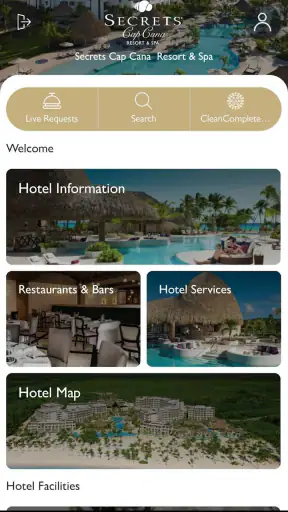
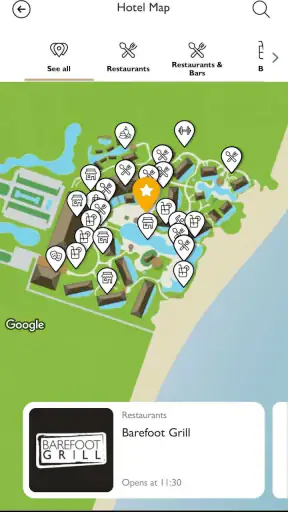
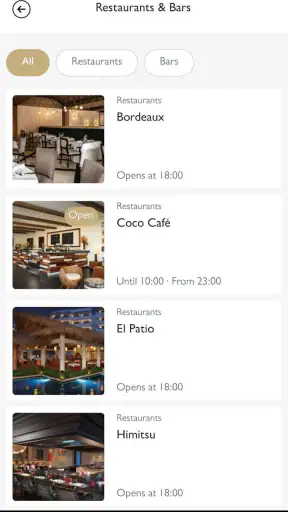
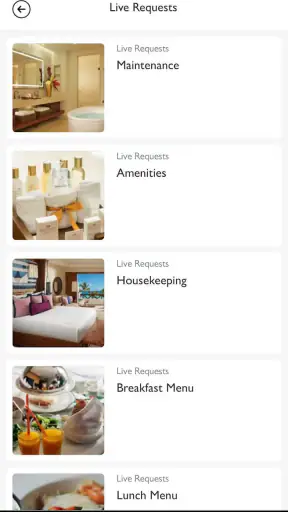
Hyatt Inclusive Collection is the kind of travel app I would install before arriving at a participating resort, rather than something I would keep opening throughout the year. Developed by STAY App, it is a free Travel & Local app built around mobile resort services for Hyatt Inclusive Collection stays. In my experience, its value depends less on entertainment and more on timing: when I am already on the property and want to check what is available, make a request, or avoid walking back to reception for a simple question.
The app has a 4.3 average from around 5.7 thousand ratings, with more than a million installs. Those figures suggest that it has reached a substantial audience of resort guests, although popularity alone does not make every stay equally smooth. The useful question is whether it fits the way you travel: do you prefer handling resort details from your phone, or would you rather rely on a front desk, printed information, and conversations with staff?
How the app feels when your holiday depends on a connection
The most important thing to understand is that this is not a general hotel search tool or a broad trip planner. Its focus is narrower and more practical: it accompanies a Hyatt Inclusive Collection vacation with access to resort-related services. That makes the setting matter. At home, opening it may not tell you much. At the resort, however, the phone becomes a convenient place to look for service information instead of trying to remember everything explained during arrival.
I found that distinction useful because resort stays create many small decisions. You may want to check what is happening before leaving the room, decide whether a request is worth making, or confirm a detail while moving between the pool, lobby, and restaurant areas. A mobile service layer can reduce those little interruptions. It does not replace the staff, but it can make the first step more direct.
The app is most useful when it shortens a real resort interaction. If I am already standing at a desk with a clear question, speaking to an employee may still be faster. If I am in the room, carrying bags, supervising children, or trying not to interrupt dinner, opening the app can be the more comfortable option. That trade-off is central to the experience.
Network-dependent moments are part of the design
Because the app is intended to connect you with current resort services, its usefulness is closely tied to connectivity. I would not treat it as a self-contained travel guide whose important information is guaranteed to be available in every situation. The practical assumption is that the app needs a working connection when you want to load service information or send a request.
This matters in places where mobile coverage changes from one area to another. A room may have a different experience from an open pool deck, and a crowded lobby can behave differently from a quiet corner of the property. I would open the app while connected and take a moment to understand the relevant screens before heading somewhere less reliable. That simple habit is more useful than waiting until I need something urgently.
There is also a difference between browsing and acting. Looking at a page that has already loaded may feel quick, while submitting a new request can depend on a fresh connection. I prefer to make service requests before walking away from a stable signal, then wait long enough to see whether the app acknowledges the action. Tapping repeatedly without confirmation is an easy way to create confusion or duplicate a request.
For travelers who expect every hotel detail to remain available in airplane mode, this may feel limiting. I would use the app alongside, not instead of, the booking confirmation, travel documents, and any essential information I need to reach the resort. Its role is the live resort layer, not my only source of trip information.
What changes when you use it in different parts of a resort
Mobile context makes a bigger difference here than it does with many ordinary travel apps. I am less likely to sit down and explore it for twenty minutes. Instead, I would use it in short bursts: before leaving the room, while deciding what to do next, or when a service question comes up during the day.
That creates a useful workflow. First, I check the app when I have time and a reliable connection. Next, I identify the service or information I need. Finally, I submit or follow up while keeping the phone available for confirmation. This is more dependable than opening it for the first time beside a noisy pool while trying to remember several details at once.
Families may appreciate that approach because resort days rarely follow a neat schedule. A child may need a change of plan, a group may split up, and nobody wants one person to spend the afternoon walking between facilities to ask basic questions. Couples and solo travelers can benefit too, particularly when they want a low-friction way to interact with the property without turning every small request into a formal conversation.
On the other hand, guests who enjoy personal contact may find the app less satisfying. A staff member can interpret a vague request, suggest an alternative, or notice a detail I forgot to mention. A mobile interface usually asks me to be more precise. I see that as a trade-off rather than a defect: the app is efficient for defined needs, while people remain better at handling unusual situations.
A realistic day-to-day example
Imagine arriving after a long journey with luggage, a tired family, and no interest in exploring the entire property immediately. Instead of trying to remember every instruction from check-in, I would settle in, connect my phone, and use the app to orient myself around the resort services that matter first. If I need help later, I already know where to begin.
The next morning, I might check it before breakfast while everyone is deciding how to spend the day. If a service request is appropriate, I would send it while the connection is stable and keep an eye on the app for a response or status change. If nothing appears to move, I would not assume the request failed or succeeded; I would verify through the resort team rather than submitting it several times.
That example shows the app at its best. It does not magically organize a whole holiday, but it can remove a few unnecessary trips and give the phone a clear job during the stay. The benefit becomes noticeable through several small conveniences rather than one dramatic feature.
Failure, recovery, and sensible backup habits
Connectivity problems are not always obvious. A screen may take longer to load, a request may appear to pause, or a page may open without the latest information. When that happens, I would first check whether other apps are connecting. If they are also struggling, the problem is probably the network rather than the resort service itself.
If the app is the only thing behaving oddly, I would close and reopen it, move to a place with a stronger connection, and try once more only after checking whether the first action was recorded. This is especially important for anything that could create a duplicate request. A quick screenshot of a confirmation screen can also make follow-up easier, provided I am not treating the screenshot as a live status update.
When the app still does not help, the front desk or another resort employee is the correct recovery path. I would explain what I tried and when, rather than simply saying the app failed. That gives staff enough context to check the request without making me repeat the entire story. The app works best as one channel among several, not as a reason to delay urgent assistance.
I also recommend keeping essential travel details outside the app. Boarding information, identification documents, reservation references, and emergency contacts should remain available through the tools I normally trust for those purposes. If my phone battery is low or the connection disappears, I do not want a resort-services app to be the only place where I can find something important.
Using it without wasting mobile data
For most guests, the bigger concern will not be the amount of information itself but when the phone chooses to connect. I would use the app deliberately rather than repeatedly refreshing it while moving around the property. Checking once before heading out, then again when I have a clear reason, should be more sensible than leaving it open all day.
If I am traveling internationally, I would be especially careful about roaming. Resort convenience is not worth an unexpected mobile bill. I would rely on a trusted Wi-Fi connection when available, avoid repeated reloads, and wait for a stable connection before sending a request. I would also keep background activity in mind by closing the app when I am finished, rather than assuming every travel app needs to remain active.
There is a less obvious data consideration too: attention. Notifications, if enabled on the device, can become distracting during a holiday. I would allow only the alerts that genuinely help me respond to a resort interaction and silence anything that turns the app into another source of noise. The best travel technology should reduce mental clutter, not add to it.
Privacy-conscious travelers may also prefer to review the app’s device settings and permissions before using it. I would grant only what feels necessary for the service I am trying to use, and I would remove access I no longer want after the stay. That is a general phone habit, but it matters more on vacation because travelers often install several temporary apps in a short period.
Where it beats the usual alternatives
The usual alternatives are speaking to resort staff, phoning the property, checking printed material, or using a general hotel or travel app. Each option has a place. Printed information is easy to keep nearby, but it can become outdated or difficult to search. A phone call creates direct contact, yet it may be inconvenient when I am not sure which department to ask for. A general travel app is useful for flights, maps, and reservations, but it is not designed around the day-to-day service layer of a Hyatt Inclusive Collection stay.
This app’s advantage is concentration. Instead of mixing resort requests with unrelated travel planning, it gives those property interactions their own space. That can make the experience feel less scattered, particularly for guests who already manage tickets, maps, messages, and payment tools on the same phone.
Its weakness is the same specialization. If I am comparing destinations, planning transport, finding independent restaurants, or building a city itinerary, I would choose a broader travel app. If I am staying somewhere outside the Hyatt Inclusive Collection environment, this particular tool is unlikely to be the right companion. It is a resort-service app, not a universal holiday organizer.
Who should install it before traveling
I would recommend installing it before departure to anyone staying at a relevant Hyatt Inclusive Collection resort who prefers self-service and expects to use a phone throughout the trip. Installing early gives me time to open it, sign in or identify the appropriate resort flow if required, and understand how it behaves before I am tired, rushed, or dealing with weak connectivity.
It is also a good fit for groups. One person can handle a request without everyone walking to reception, and the person who knows the details can enter them directly. That can be particularly helpful when several travelers are coordinating around different schedules. Still, I would make sure the group knows which person is sending requests so that nobody repeats the same action.
I would be more cautious if I strongly prefer face-to-face service, rarely carry a smartphone, or want one app to manage every part of a trip. The app may still be useful, but it should not be the sole reason for choosing a resort. The quality of the holiday will depend on the property, the staff, and the services available there; this tool mainly changes how I reach some of them.
Compatibility, cost, and what to expect from the current release
There is no purchase price to add to the trip budget, since the app is free. It is rated for Everyone, which makes it broadly approachable for families and mixed-age travel groups. The current version is 2.10.3 and requires Android 8.0 or later, so anyone using an older Android phone should check compatibility before relying on it.
Those details also shape my practical recommendation. I would update the app before leaving, but I would not wait until the airport or resort lobby to discover that the phone cannot run it. On iPhone or Android, I would keep the operating system and app in a usable state, carry a charger, and remember that compatibility does not guarantee a strong connection in every part of a property.
The developer, STAY App, is clearly associated with a focused resort-service experience rather than a broad destination platform. That focus is reassuring when I want a simpler tool, but it also means I should keep my normal travel essentials separate. The app complements a trip; it does not replace the rest of my travel preparation.
My connectivity verdict
After looking at how it fits into real resort routines, I see Hyatt Inclusive Collection as a useful companion for guests who want mobile access to property services and are comfortable working around a live connection. Its strongest moments happen before a request, when I can prepare calmly, and during ordinary gaps in the day when walking to a desk would be inconvenient.
I would not judge it by whether it can replace every conversation with staff. That is not where it offers the most value. I judge it by whether it helps me handle defined resort tasks with less interruption, while giving me a reasonable fallback when the network or the interface gets in the way.
My recommendation is positive, with one condition: install it as a convenience channel, not as your only safety net. Keep essential documents elsewhere, use a stable connection before sending requests, avoid repeated taps when a response is delayed, and contact resort staff when the situation is urgent or unclear. Used that way, this free Travel & Local app can make a Hyatt Inclusive Collection stay feel more manageable without asking the phone to do more than it should.


